Who this is for: New users who want to create a Reap Direct account
What this article covers: How to register for a Reap Direct account, complete account verification (KYB), and apply for a Reap Card.
Overview
This article walks you through creating a new Reap Direct account. The process takes about two minutes and requires a business email address and a phone number.
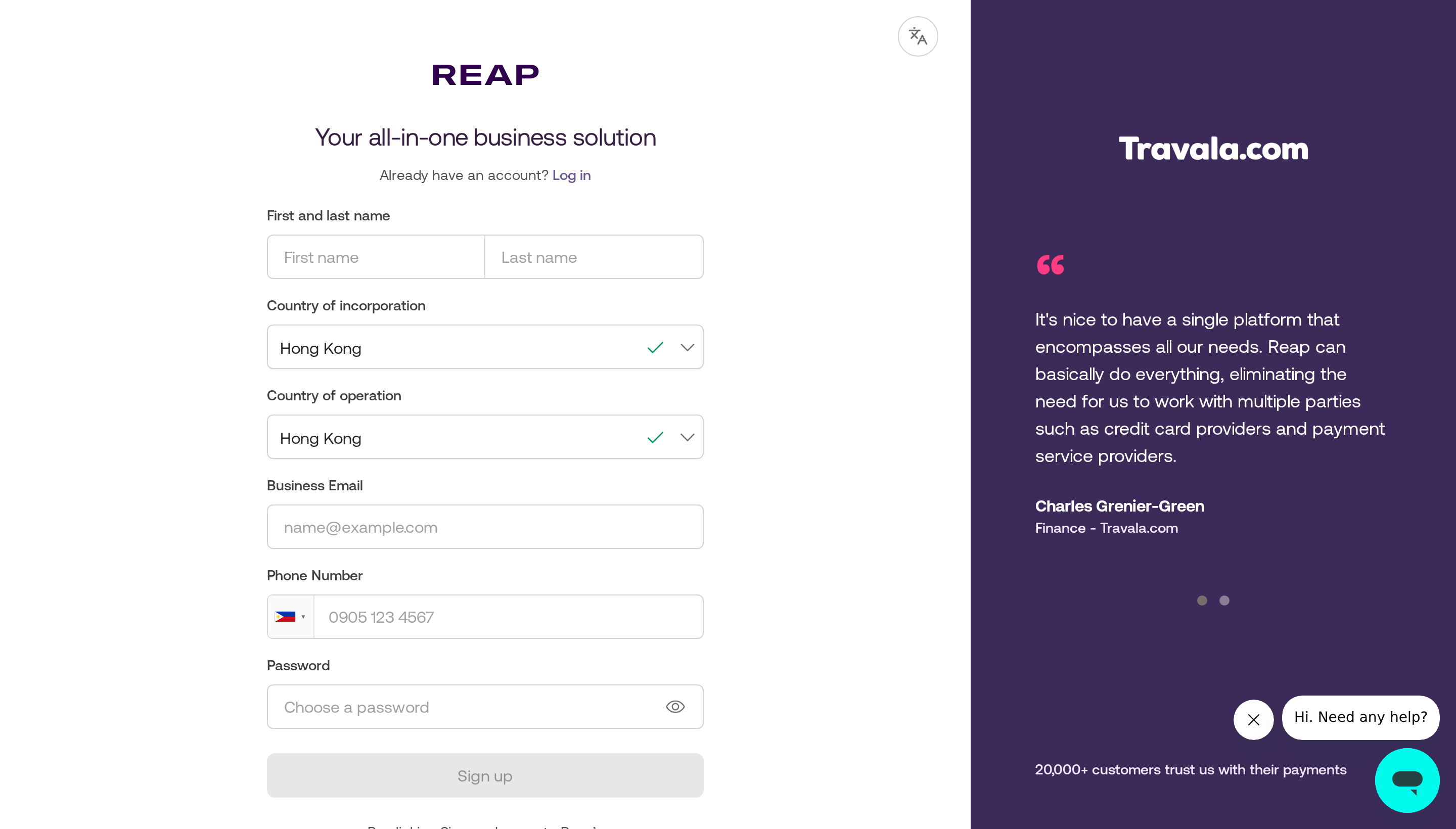
The Reap sign-up page showing the registration form on the left and a customer testimonial panel on the right
Jump to
- Before you begin
- How to sign up
- Account setup and verification
- Applying for a Reap Card
- Frequently Asked Questions
- Contact our Support Team
Before you begin
Before starting, make sure you have the following ready:
- A business email address that you have access to. Reap will send a verification link to this address.
- Your company's country of incorporation and country of operation.
- A mobile phone number for your account.
💡A fast start — verification comes next
Creating your account only takes your email, phone number, and basic company details. KYB documents and UBO information are collected in a later step — you won't be asked for these during sign-up.
How to sign up
- Open your browser and go to dashboard.reap.global/register. You'll see the sign-up form on the left
-
Fill in all fields in the form. Use your work email address. Personal addresses (e.g. Gmail, Yahoo) are not accepted at the moment. Your password must be at least 8 characters and include uppercase, lowercase, and a number or symbol.
Field
Notes
First and last name Enter your legal name as it appears on your identification documents. Country of incorporation The country where your company is registered. Country of operation The country where your business primarily operates. This may be the same as your country of incorporation. Business email Use your work email address. A verification link will be sent here. Phone number Select your country code from the flag dropdown, then enter your mobile number. Password At least 8 characters, including uppercase, lowercase, and a number or symbol. - Click Sign up at the bottom of the form. By doing so, you agree to Reap's Terms of Service and Privacy Policy.
- Check your inbox for a verification email from Reap and click the link inside to confirm your account.
- Didn't get the email? Check your spam or junk folder first.
- On the confirmation screen, click Resend the email to request a new one.
- Verification links expire after 24 hours. If yours has lapsed, simply request a fresh one.
- Once your email is verified, you'll be guided through a short setup flow before landing on your Reap Direct dashboard. This takes about 2 minutes to complete.
Account setup and verification
After verifying your email, you'll go through three steps before your account is fully active: selection of the product account (Reap Direct), a short onboarding questionnaire, then the account setup (KYB) form.
Step 1: Select Account Opening for Reap Direct
You will be routed to Reap’s Launchpad where you can explore our products. For a Reap Direct application, please click “Get Started” under Reap Direct.
Step 2: Onboarding questionnaire (~2 minutes)
Reap will ask a few questions to personalize your experience. Work through each screen and click Continue:
-
Tell us about your business: Select your industry and company size.
-
What are your business needs at Reap?: Select your monthly expense range and what business expenses you’ll use Reap for.
Step 3: Complete account setup (KYB)
After the questionnaire, you'll land on the Complete account setup page. The left-hand sidebar tracks your progress through each section:
- Business details: enter your legal business name, type of business, industry, date of incorporation, website or social media URL, a short company description, and where you sell (Domestic, International, or Both).
- Business owners: provide details about your company's What is Ultimate Beneficial Ownership (UBOs)?, specifically anyone who owns 25% or more of the company.
- Business directors: add information about your company's directors.
- Phone verification: verify the mobile number linked to your account.
- Support documents: upload your KYB documents. The exact documents required depend on your country of incorporation. See KYB document requirements by country for the full list.
- Summary: review all submitted information and submit your application.
After submission
Once submitted, your dashboard will show Account Verification: Under review. Our team typically completes the review within 1-3 business days. You'll receive an email notification once your account is fully approved and all features are unlocked.
To check your application status at any time, go to Settings > Company in your dashboard, or contact our support team.
Applying for a Reap Card
Once your Reap Direct account has been fully verified, the Cards section will appear in the left-hand menu. From there, you can set up your card credit limit, create virtual and physical cards, and manage team spend.
To get started with your Reap Card:
- Log in to your dashboard at dashboard.reap.global.
- In the left-hand menu, click Cards.
- Click Add funds to set your card credit limit. Reap Card is a secured credit card, so your credit limit is based on the collateral you deposit.
- Once your deposit is confirmed, click + Create card to issue your first virtual or physical card.
For a full walkthrough of the Reap Card lifecycle, including team setup, spending, and repayment, see Getting Started With Your Card.
Frequently Asked Questions
Can I use a personal email address to sign up?
Reap requires a business email address to register. Personal email addresses from providers such as Gmail or Yahoo may be rejected during sign-up. Use your work email address (e.g. yourname@company.com) to register.
I did not receive the verification email. What should I do?
First, check your spam or junk folder. If the email is not there, return to the confirmation screen and click Resend the email. If you still do not receive it after a few minutes, contact our support team with your registered email address.
The verification link has expired. Can I get a new one?
Yes. Return to the sign-up page and attempt to register again using the same email address. Reap will send you a fresh verification link.
Can I change my email address after signing up?
Yes. You can update your email address directly from your Reap Direct dashboard. Go to Settings → Personal, click into the Email field, enter your new address, and click Save. Reap will send a verification link to the new address, you must click it before the change takes effect. Until then, your original email remains active.
How long does account verification take after I verify my email?
After email verification, our team reviews your account details as part of our standard onboarding process. This typically takes one to three business days. You will receive an email notification once your account has been fully approved.
Contact our Support Team
If you have questions or need assistance, contact our support team via the Live Chat in the Reap Dashboard (bottom right corner) or email us at hello@reap.global
For more information, visit Know who to talk to at Reap.